11.6 Linear Regression
In this section, we introduce linear regression, one of the most widely used statistical models. Linear regression allows us to model the relationship between a continuous response variable and one or more predictor variables.
11.6.1 Simple Linear Regression
A simple linear regression models the relationship between a response variable \(y\) and a single predictor variable \(x\) as: \[y = \beta_0 + \beta_1 x + \epsilon,\] where \(\beta_0\) is the intercept, \(\beta_1\) is the slope, and \(\epsilon\) is the error term.
In R, we use the lm() function (short for “linear model”) to fit a regression. The syntax uses a formula: y ~ x.
library(r02pro)
model <- lm(sale_price ~ liv_area, data = sahp)
summary(model)
#>
#> Call:
#> lm(formula = sale_price ~ liv_area, data = sahp)
#>
#> Residuals:
#>      Min       1Q   Median       3Q      Max
#> -193.441  -32.964   -1.663   22.530  215.137
#>
#> Coefficients:
#>              Estimate Std. Error t value Pr(>|t|)
#> (Intercept)  7.206839  14.641271   0.492    0.623
#> liv_area     0.116886   0.009394  12.443   <2e-16 ***
#> ---
#> Signif. codes:  0 '***' 0.001 '**' 0.01 '*' 0.05 '.' 0.1 ' ' 1
#>
#> Residual standard error: 59.76 on 162 degrees of freedom
#>   (1 observation deleted due to missingness)
#> Multiple R-squared:  0.4887, Adjusted R-squared:  0.4855
#> F-statistic: 154.8 on 1 and 162 DF,  p-value: < 2.2e-16
The summary() output includes:
- Coefficients: the estimated intercept (\(\hat\beta_0\)) and slope (\(\hat\beta_1\)), along with their standard errors, t-values, and p-values.
- R-squared: the proportion of variance in the response explained by the predictor. A value closer to 1 indicates a better fit.
- F-statistic: tests whether the overall model is statistically significant.
In this example, the slope for liv_area tells us the estimated change in sale_price for each additional unit increase in living area.
11.6.2 Visualizing the Regression Line
You can easily overlay the regression line on a scatterplot using geom_smooth() in ggplot2.
library(ggplot2)
ggplot(sahp, aes(x = liv_area, y = sale_price)) +
  geom_point() +
  geom_smooth(method = "lm", se = TRUE, color = "blue") +
  labs(title = "Sale Price vs. Living Area",
       x = "Living Area (sq ft)",
       y = "Sale Price (thousands)")
#> `geom_smooth()` using formula = 'y ~ x'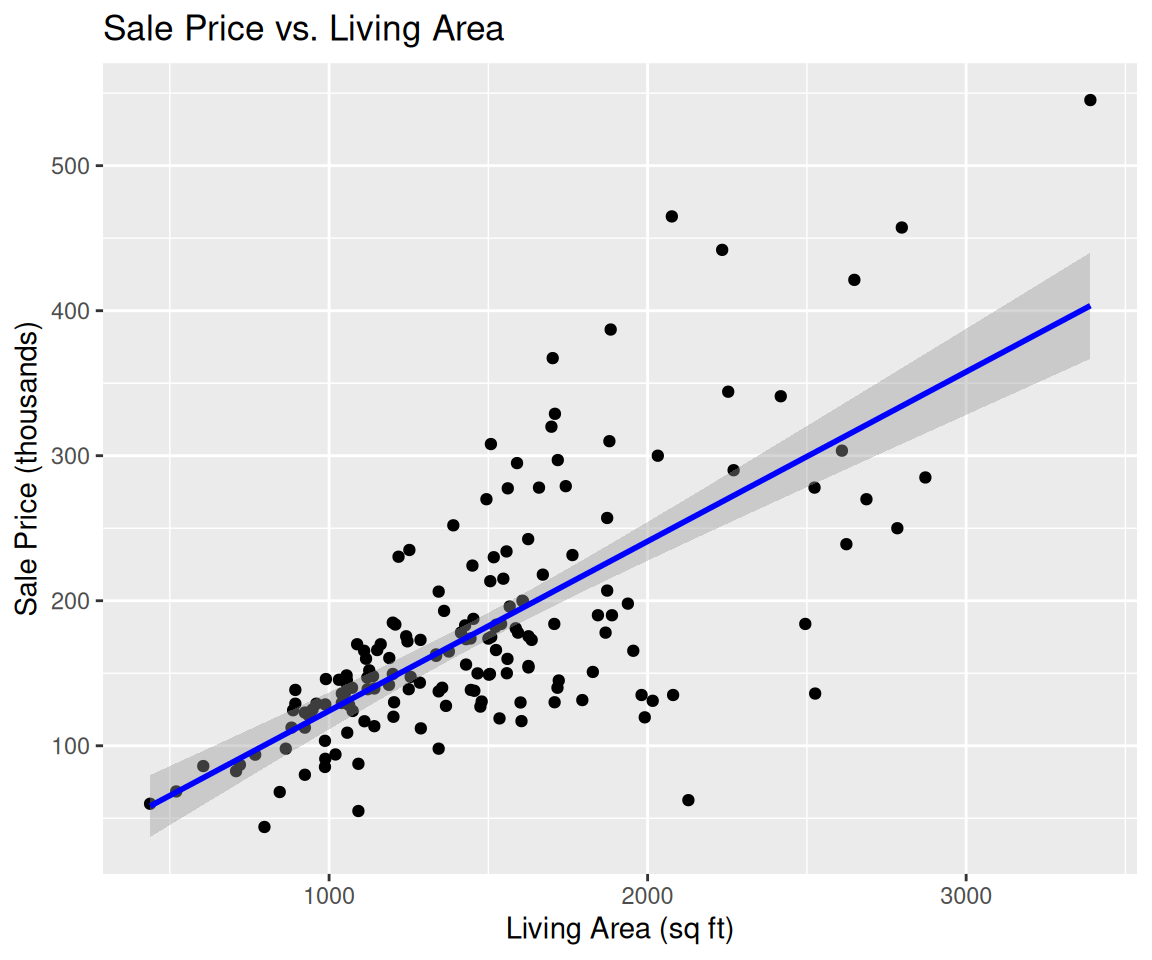
The shaded region around the line represents the 95% confidence interval for the regression line.
11.6.3 Multiple Linear Regression
You can include multiple predictors by adding them to the formula with +.
model_multi <- lm(sale_price ~ liv_area + lot_area + oa_qual, data = sahp)
summary(model_multi)
#>
#> Call:
#> lm(formula = sale_price ~ liv_area + lot_area + oa_qual, data = sahp)
#>
#> Residuals:
#>     Min      1Q  Median      3Q     Max
#> -98.044 -27.811  -1.472  21.637 142.101
#>
#> Coefficients:
#>               Estimate Std. Error t value Pr(>|t|)
#> (Intercept) -1.497e+02  1.440e+01 -10.399  < 2e-16 ***
#> liv_area     4.234e-02  8.051e-03   5.259 4.62e-07 ***
#> lot_area     4.066e-03  6.618e-04   6.144 6.21e-09 ***
#> oa_qual      3.721e+01  2.666e+00  13.960  < 2e-16 ***
#> ---
#> Signif. codes:  0 '***' 0.001 '**' 0.01 '*' 0.05 '.' 0.1 ' ' 1
#>
#> Residual standard error: 39.28 on 159 degrees of freedom
#>   (2 observations deleted due to missingness)
#> Multiple R-squared:  0.7829, Adjusted R-squared:  0.7788
#> F-statistic: 191.1 on 3 and 159 DF,  p-value: < 2.2e-16
Each coefficient represents the estimated effect of that predictor while holding the other predictors constant.
11.6.4 Extracting Model Information
R provides several useful functions to extract information from a fitted model.
# Fitted (predicted) values
head(fitted(model))
#>        1        3        4        5        6        7
#> 180.0818 130.7558 175.9908 176.1077 227.8883 132.5091

# Residuals (observed - fitted)
head(residuals(model))
#>          1          3          4          5          6          7
#> -49.581814 -21.755756  -1.990790 -37.607676 -37.888348   7.490948

# Coefficients
coef(model)
#> (Intercept)    liv_area
#>   7.2068391   0.1168864

# Confidence intervals for coefficients
confint(model)
#>                    2.5 %     97.5 %
#> (Intercept) -21.70551022 36.1191884
#> liv_area      0.09833663  0.1354362
11.6.5 Diagnostic Plots
Checking model assumptions is an important step in regression analysis. R provides built-in diagnostic plots.
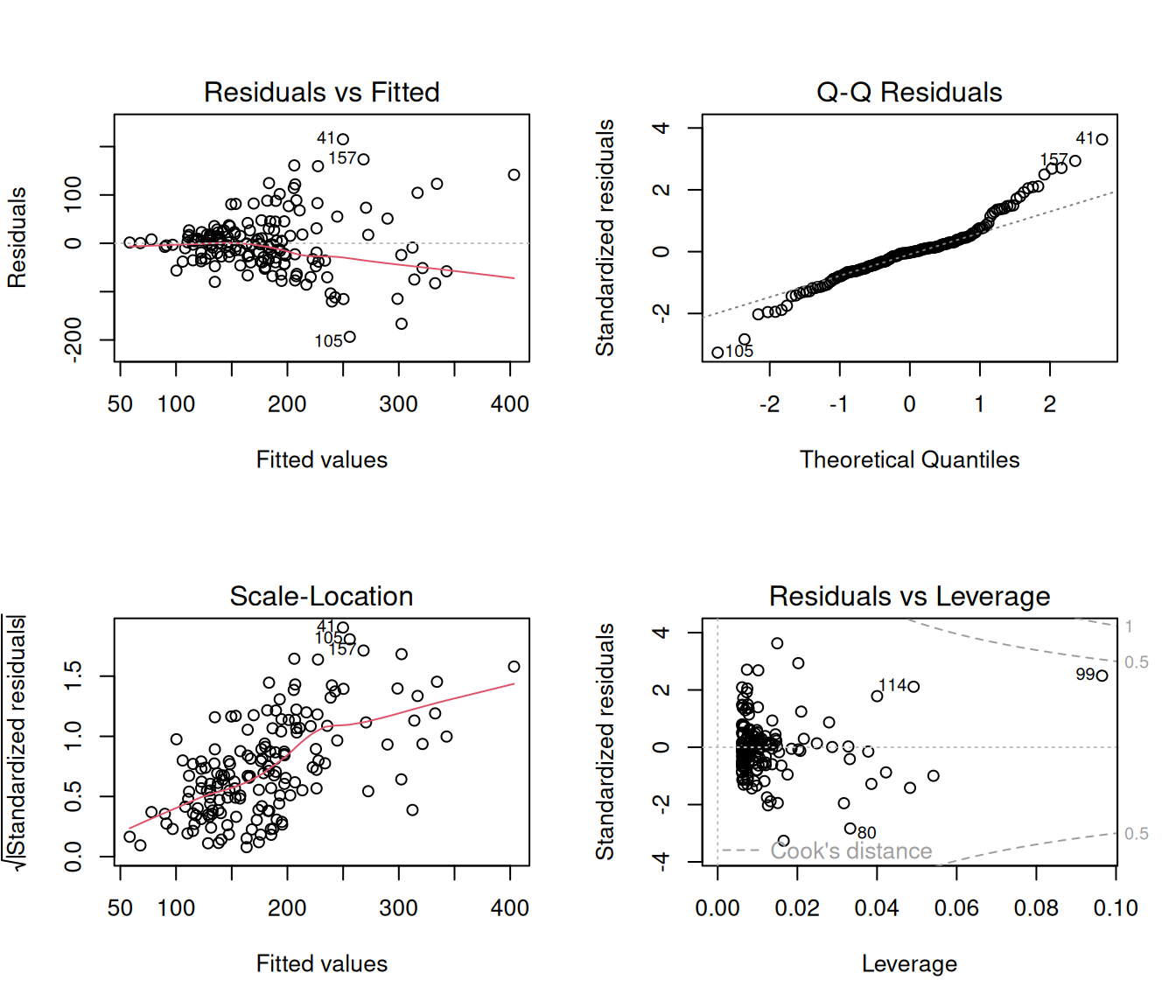
These four plots help you check:
- Residuals vs Fitted: linearity and homoscedasticity (constant variance)
- Normal Q-Q: normality of residuals
- Scale-Location: another view of homoscedasticity
- Residuals vs Leverage: influential observations
11.6.6 Exercises
Using the
sahpdataset, fit a simple linear regression ofsale_priceonlot_area. Interpret the estimated slope coefficient.Using the
gm2004dataset from the r02pro package, fit a simple linear regression oflife_expectancyonGDP_per_capita. What is the R-squared value? What does it tell you?Create a scatterplot of
life_expectancyvs.GDP_per_capitafrom Exercise 2 and overlay the regression line usinggeom_smooth(method = "lm").Fit a multiple linear regression of
sale_priceonliv_area,lot_area,oa_qual, andyr_builtusing thesahpdataset. Which predictors are statistically significant at the 0.05 level?For the model in Exercise 4, generate the four diagnostic plots using
plot(). Do you see any violations of the model assumptions?
